▸ MISSION CONTROL FOR REAL ESTATE TEAMS
Mission control for your real estate operation
TED SYSOPS tracks every deal, task, and dollar from contract to closing — and its Automators run your team's playbook on autopilot, so nothing slips through the cracks.
30-day free trial (card required — you won't be charged until day 31)
▸ THE PROBLEM
Deals don't die from bad luck. They die from dropped steps.
Scattered everywhere
The contract's in email, the numbers are in a spreadsheet, the buyer update is in a text thread. Nobody sees the whole deal.
Dates slip silently
Miss a due-diligence deadline or a closing date and real money walks. A reminder on someone's phone is not a system.
Process lives in heads
When your best closer is out, their playbook is out with them. New hires learn by breaking things.
▸ PIPELINE
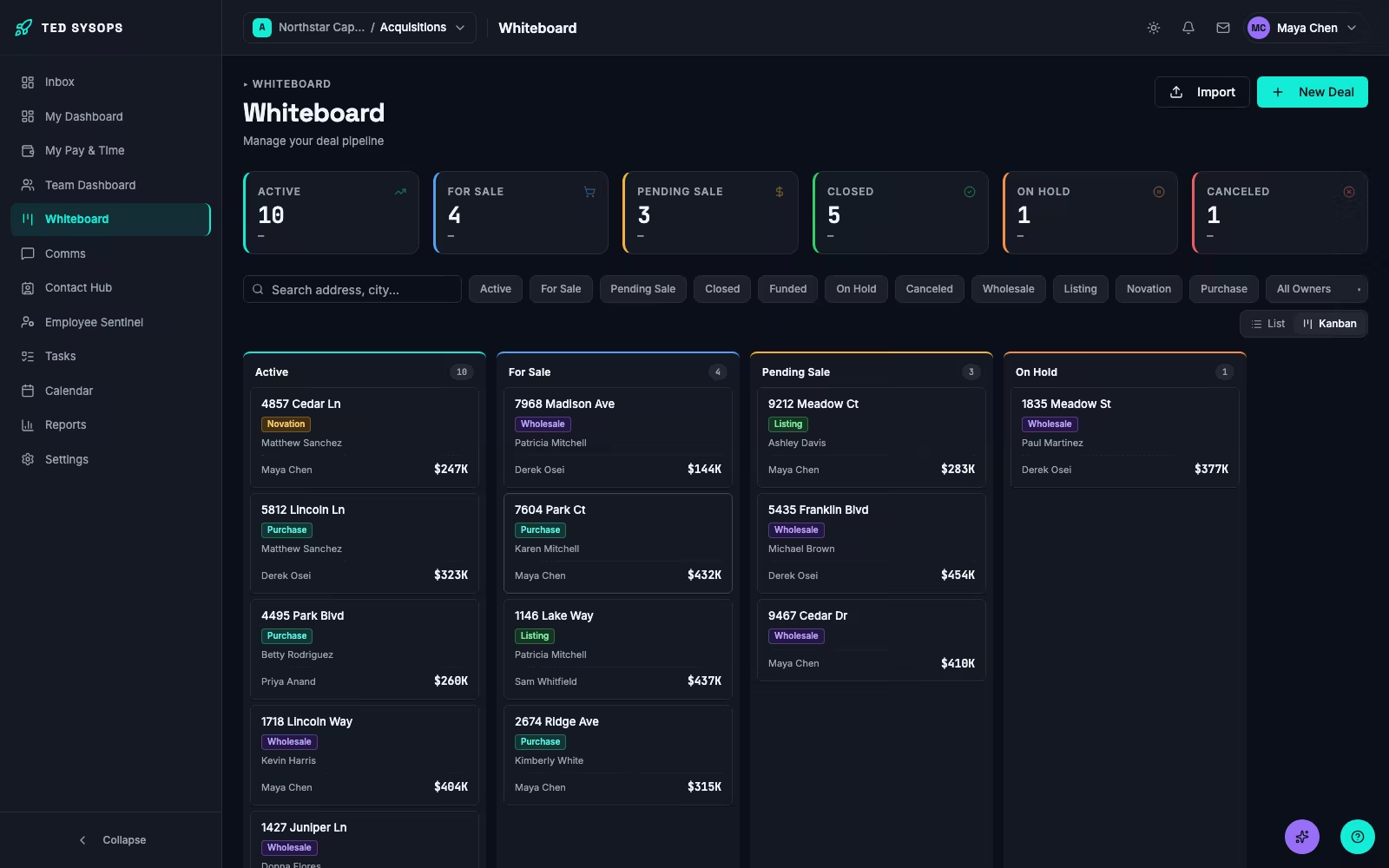
See every deal's whole journey at a glance
TED's pipeline tracks each deal across parallel stage lanes — from contract to title to buyer marketing to closing — so "where are we on this one?" takes five seconds, not a meeting.
- A kanban board of your whole pipeline, filterable by status, deal type, and owner
- A progress strip on every deal's header — one segment per stage, with live percentages
- Drill into any stage to see its statuses, what's running, and what starts next
- Rename, recolor, and reorder stages to match how your team actually works

▸ AUTOMATORS
Your best process, on autopilot
Turn your playbook into Automators — step-by-step workflows that assign the tasks, watch the dates, draft the emails, and ask for sign-off at the moments that matter.
- Tasks assign themselves, with due dates anchored to real deal dates — contract, due-diligence end, closing
- Approvals with a separate verifier, so the critical step doesn't clear on one person's say-so
- Branching questions route each deal down the right path automatically
- Emails draft themselves from templates and merge fields — you review before anything sends, and automatic sending stays off until you switch it on
- When something needs a human, the run flags it and waits — nothing fires blind
- 16 ready-made Automators included: Contract Executed Kickoff, Open Title & Escrow, Launch Buyer Marketing, Cure Title Issue, and more


▸ ASK TED
Ask TED. Your operation, on speaking terms.
Ask TED is the AI assistant built into every plan. Ask it about your deals, your numbers, or your process and it answers from your data — and when you ask it to change something, it shows you the plan first.
- Ask it to find a deal, log an expense, record an offer, or move a stage — it stages the change as a plan and waits for your OK before anything touches live data.
- Ask "who should I call for this deal?" and get ranked buyer and lender matches — the same scoring the Contacts page uses.
- Ask real business questions — this month's closing revenue, your best dispo agent, what's stalled — and get numbers straight from your data, never an estimate.
- Available everywhere — press ⌘J (Ctrl+J on Windows) on any page, or ask it right from Slack.
- Describe a workflow in plain English and it drafts the Automator — you publish.
- Ask a how-do-I question and it hands you straight to a real support conversation instead of guessing.

▸ MONEY
Cent-precise from contract to commission
Every dollar on a deal is tracked, split, and explained — projections while it's live, actuals when it closes.
- A profit breakdown per deal: price, expenses, splits, and what's left
- Commission rules that resolve themselves — role rules, per-person overrides, expiry dates
- Joint-venture splits with partner companies, tracked per deal
- Everyone sees their own earnings and exactly how they were calculated
- Portfolio reports: profit by lead source and by rep, closed-deal P&L, QuickBooks export, and scheduled delivery to your inbox.
- Track title issues and liens against a deal — with automated cure playbooks that spin up per issue.

▸ COMMS & EMAIL
The conversation lives with the deal
Stop reconstructing deals from text threads. Every deal has its own chat with the right people already in it — and real email sends from your own address, right from the deal.
- A chat on every deal — everyone assigned to it is in the room automatically
- Channels, groups, and direct messages for everything else, with @mentions that notify
- Deal events — status changes, new offers, expenses — can post to the deal's chat on their own
- Connect Google or Microsoft: send from your address, attach files, push deal dates to your calendar

▸ CONFIGURATION
Built to fit your operation, not the other way around
Your fields, your stages, your dropdowns, your rules — TED bends to how your team runs deals.
- Custom fields on deals — eleven kinds, with show-when logic and required rules
- Rearrange the entire Deal Info layout from Settings — no developer needed
- Your own lists for lead sources, contact types, deal types, strategies, property conditions, and more
- Roles and permissions that control who sees and edits what
- Leads flow in on their own — InvestorFuse and generic webhooks create deals for you
- Bring your existing book with you — import contacts and deals from CSV or Excel, map the columns once, preview, and undo if it isn't right.

▸ HOW TED COMPARES
How TED compares to the alternatives
Every team getting to TED started somewhere else. Here's where those tools start to strain after the contract is signed.
| If you run on… | What breaks as you scale | How TED handles it |
|---|---|---|
| Spreadsheets or a generic CRM | No shared source of truth for stage, tasks, or money. It lives in someone's head or an unshared formula. | One pipeline everyone sees, with tasks and commissions calculated the same way every time. |
| General no-code / DIY automation tools | A general work platform, not real estate. Every stage, rule, and approval is a workflow you build and maintain yourself. | 16 real-estate Automators come built in, or describe your process to Ask TED and it drafts one for you to review. |
| Marketing-first wholesaling CRMs | Built around finding and qualifying sellers first. Closing-side workflow and AI-assisted operations are secondary. | Deal operations from contract to closing is the whole product: approvals, cent-precise splits, a chat on every deal, and an AI assistant that acts only after you approve. |
TED's free trial runs 30 days. Nothing is charged until day 31.
▸ FULL SYSTEMS CHECK
And the rest of the ship
Contact Hub
Sellers, buyers, and vendors in one place — with linked deals, ratings, and the markets they cover.
Employee Sentinel
Your roster with roles, departments, and compensation — searchable and exportable.
My Tasks & Team Runs
Everything assigned to you in one list, and a team-wide view of every running workflow.
Dashboards
Personal and team mission control: stale deals, activity, and what needs attention.
Calendar
Deal dates on your real calendar, pushed through your own connected account.
Help that answers
A searchable help center and an AI support chat that answers from it — with humans behind it.
One-click problem reports
Spot something off? Report it from any page — the context files itself.
Dark mode
A proper one. Toggle it from any page, including this one.
Multi-team organizations
Run several markets or entities under one login, each with its own walled-off workspace.
▸ LAUNCH SEQUENCE
From signup to running deals in an afternoon
Create your workspace
Sign up and TED seeds your team with a working pipeline and sixteen ready-made Automators. Nothing to configure before you start.
Bring your deals and your people
Add deals by hand, or let InvestorFuse and webhooks create them for you. Invite the team and set their roles.
Run your playbook
Start an Automator on a deal and watch tasks assign, dates arm, and emails draft. You keep command; TED keeps course.
▸ PRICING
Straightforward pricing
30-day free trial (card required — you won't be charged until day 31)
Starter
For a solo operator or a two-person team getting the pipeline off the ground.
- 2 seats included
- Up to 5 active deals
- 25 AI credits/month
Scale
For a growing team ready to automate the whole deal lifecycle.
- 5 seats included · +$59/seat
- Up to 25 active deals
- 100 AI credits/month
- Event-triggered Automators
- Commission tracking
- Portfolio reports
Pro
For teams running multiple markets, or a full back office.
- 12 seats included · +$49/seat
- Unlimited active deals
- 400 AI credits/month
- Event-triggered Automators
- Commission tracking
- Portfolio reports
- Approval workflows
- Manager analytics
- Scheduled report delivery
- Deep reasoning
Enterprise
Custom seats, volume pricing, multiple teams, and a dedicated onboarding contact for larger operations, title companies, transaction coordinators, and multi-brand operations.
placeholder
- Everything in Pro
- Custom seats and volume pricing
- Dedicated onboarding contact
Coordinate transactions for multiple companies?
TED works for transaction coordinators and title companies too — run every client's deals from one login. Reach out and we'll put together a plan built for you.
AI credits power Ask TED, the AI assistant built into every plan. Asking a question about your deals, drafting an email, or planning an Automator uses 1 credit; a deep-mode Automator build uses 4. Every plan includes a monthly allowance, and extra credits are $19 per 100.
Not right for you? Get a full refund any time in your first 30 days — no questions asked.
▸ FAQ
Questions, answered
Put your operation on mission control.
Set up your workspace in minutes. Your pipeline and your first sixteen Automators are already waiting.